


Dynamically Create View Elements - Android Example
Get Registered Email Accounts - Android Example
Create Notification Alert - Android Example
Skew Or Bind Image On SDCARD - Android Example
Swipe screen left right top bottom
Create Repeating Alarm Start After Each 2 Minutes
In this example creating a date picker to pick day month year of date.
Time Picker With AM_PM Values - Android Example
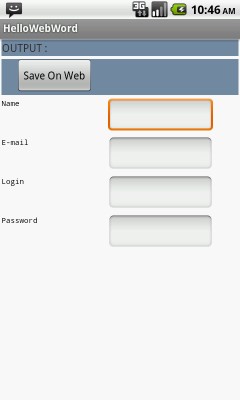
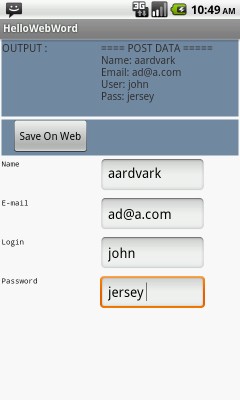
In this example we will learn how to make POST Method request to server in android.
Always call server with the use of thread and handlers, if not using request with thread then server request will lock activity to complete request , if user will interact with activity before server request complete then activity will give ANR (FORCE CLOSE ERROR) problem.
      public class HttpPostExample extends Activity {

            TextView content;
            EditText fname, email, login, pass;
            String Name, Email, Login, Pass;

            /** Called when the activity is first created. */
            @Override
            public void onCreate(Bundle savedInstanceState) {
                super.onCreate(savedInstanceState);
                setContentView(R.layout.activity_http_post_example);

                content    =   (TextView)findViewById( R.id.content );
                fname      =   (EditText)findViewById(R.id.name);
                email      =   (EditText)findViewById(R.id.email);
                login      =    (EditText)findViewById(R.id.loginname);
                pass       =   (EditText)findViewById(R.id.password);


                Button saveme=(Button)findViewById(R.id.save);

                saveme.setOnClickListener(new Button.OnClickListener(){

                    public void onClick(View v)
                    {
                        try{

                                 // CALL GetText method to make post method call
                                GetText();
                         }
                        catch(Exception ex)
                         {
                            content.setText(" url exeption! " );
                         }
                    }
                });
            }

        // Create GetText Metod
      public  void  GetText()  throws  UnsupportedEncodingException
            {
                // Get user defined values
                Name = fname.getText().toString();
                Email   = email.getText().toString();
                Login   = login.getText().toString();
                Pass   = pass.getText().toString();

                 // Create data variable for sent values to server

                  String data = URLEncoder.encode("name", "UTF-8")
                               + "=" + URLEncoder.encode(Name, "UTF-8");

                  data += "&" + URLEncoder.encode("email", "UTF-8") + "="
                              + URLEncoder.encode(Email, "UTF-8");

                  data += "&" + URLEncoder.encode("user", "UTF-8")
                              + "=" + URLEncoder.encode(Login, "UTF-8");

                  data += "&" + URLEncoder.encode("pass", "UTF-8")
                              + "=" + URLEncoder.encode(Pass, "UTF-8");

                  String text = "";
                  BufferedReader reader=null;

                  // Send data
                try
                {

                    // Defined URL  where to send data
                    URL url = new URL("/media/webservice/httppost.php");

                 // Send POST data request

                  URLConnection conn = url.openConnection();
                  conn.setDoOutput(true);
                  OutputStreamWriter wr = new OutputStreamWriter(conn.getOutputStream());
                  wr.write( data );
                  wr.flush();

                  // Get the server response

                reader = new BufferedReader(new InputStreamReader(conn.getInputStream()));
                StringBuilder sb = new StringBuilder();
                String line = null;

                // Read Server Response
                while((line = reader.readLine()) != null)
                    {
                           // Append server response in string
                           sb.append(line + "\n");
                    }


                    text = sb.toString();
                }
                catch(Exception ex)
                {

                }
                finally
                {
                    try
                    {

                        reader.close();
                    }

                    catch(Exception ex) {}
                }

                // Show response on activity
                content.setText( text  );

            }

        }
This file will get POST method request and send response.
 <?php

        $name   = urldecode($_POST['name']);
        $user   = urldecode($_POST['user']);
        $email  = urldecode($_POST['email']);
        $pass   = urldecode($_POST['pass']);

        print " ==== POST DATA =====
        Name  : $name
        Email : $email
        User  : $user
        Pass  : $pass";

  ?>
 Facebook Integration - Android Example Android SharedPreferences Basics Play Video File - Android Example Upload File To Server - Android Example Incomming SMS Broadcast Receiver - Android Example