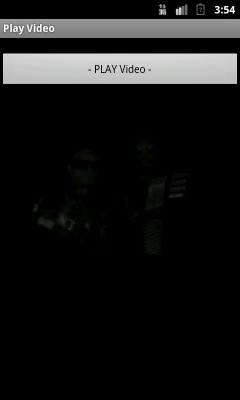
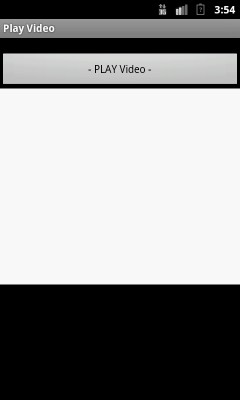


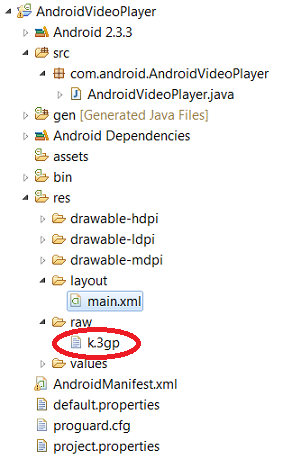
In this example showing code to play video. Taking a video(3gp) file inside application raw folder and playing in on activity.
Using VideoView class to load video from various sources (such as resources or content providers), takes care of computing its measurement from the video so that it can be used in any layout manager, and provides various display options such as scaling and tinting.
package com.android.AndroidVideoPlayer;

import android.app.Activity;
import android.graphics.PixelFormat;
import android.media.MediaPlayer;
import android.net.Uri;
import android.os.Bundle;
import android.view.SurfaceHolder;
import android.view.SurfaceView;
import android.view.View;
import android.widget.Button;
import android.widget.VideoView;

//Implement SurfaceHolder interface to Play video
//Implement this interface to receive information about changes to the surface
public class AndroidVideoPlayer extends Activity implements SurfaceHolder.Callback{

	MediaPlayer mediaPlayer;
	SurfaceView surfaceView;
	SurfaceHolder surfaceHolder;
	boolean pausing = false;;


    /** Called when the activity is first created. */
    @Override
    public void onCreate(Bundle savedInstanceState) {
        super.onCreate(savedInstanceState);
        setContentView(R.layout.main);

        Button buttonPlayVideo = (Button)findViewById(R.id.playvideoplayer);

        getWindow().setFormat(PixelFormat.UNKNOWN);

        //Displays a video file.
        VideoView mVideoView = (VideoView)findViewById(R.id.videoview);


        String uriPath = "android.resource://com.android.AndroidVideoPlayer/"+R.raw.k;
		Uri uri = Uri.parse(uriPath);
        mVideoView.setVideoURI(uri);
        mVideoView.requestFocus();
        mVideoView.start();


        buttonPlayVideo.setOnClickListener(new Button.OnClickListener(){

			@Override
			public void onClick(View v) {

				    // VideoView refference see main.xml
				    VideoView mVideoView = (VideoView)findViewById(R.id.videoview);

			        String uriPath = "android.resource://com.android.AndroidVideoPlayer/"+R.raw.k;

					Uri uri = Uri.parse(uriPath);
			        mVideoView.setVideoURI(uri);
			        mVideoView.requestFocus();
			        mVideoView.start();


			}});
     }

	@Override
	public void surfaceChanged(SurfaceHolder holder, int format, int width,
			int height) {
		// TODO Auto-generated method stub

	}

	@Override
	public void surfaceCreated(SurfaceHolder holder) {
		// TODO Auto-generated method stub

	}

	@Override
	public void surfaceDestroyed(SurfaceHolder holder) {
		// TODO Auto-generated method stub

	}
}
Define VideoView as xml element to play video on activity.
<?xml version="1.0" encoding="utf-8"?>
<LinearLayout xmlns:android="http://schemas.android.com/apk/res/android"
    android:orientation="vertical"
    android:layout_width="fill_parent"
    android:layout_height="fill_parent"
    >
  <TextView
    android:layout_width="fill_parent"
    android:layout_height="wrap_content"
    android:text="@string/hello"
    />
  <Button
	android:id="@+id/playvideoplayer"
    android:layout_width="fill_parent"
    android:layout_height="wrap_content"
    android:text="- PLAY Video -"
    />


   <VideoView
	android:id="@+id/videoview"
    android:layout_width="fill_parent"
    android:layout_height="wrap_content"
    />


</LinearLayout>
<?xml version="1.0" encoding="utf-8"?>
<manifest xmlns:android="http://schemas.android.com/apk/res/android"
      package="com.android.AndroidVideoPlayer"
      android:versionCode="1"
      android:versionName="1.0">
    <uses-sdk android:minSdkVersion="10" />

    <application android:icon="@drawable/icon" android:label="@string/app_name">
        <activity android:name=".AndroidVideoPlayer"
                  android:label="@string/app_name">
            <intent-filter>
                <action android:name="android.intent.action.MAIN" />
                <category android:name="android.intent.category.LAUNCHER" />
            </intent-filter>
        </activity>

    </application>
</manifest>
 Facebook Integration - Android Example Android SharedPreferences Basics Play Video File - Android Example Upload File To Server - Android Example Incomming SMS Broadcast Receiver - Android Example