

Dynamically Create View Elements - Android Example
Get Registered Email Accounts - Android Example
Create Notification Alert - Android Example
Skew Or Bind Image On SDCARD - Android Example
Swipe screen left right top bottom
Create Repeating Alarm Start After Each 2 Minutes
In this example creating a date picker to pick day month year of date.
Time Picker With AM_PM Values - Android Example
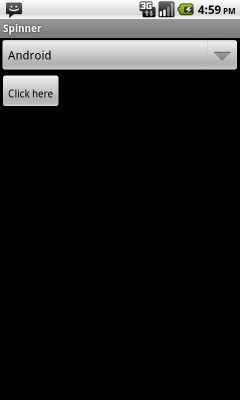
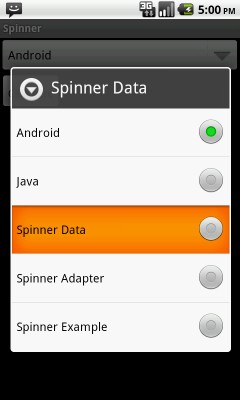
In this example creating a simple spinner ( Dropdown list ).
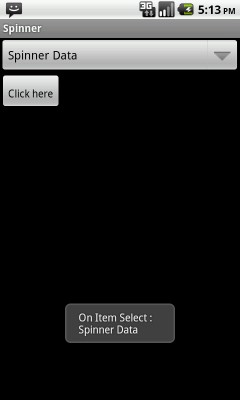
Creating listener for spinner item selection and showing selected option in alert.
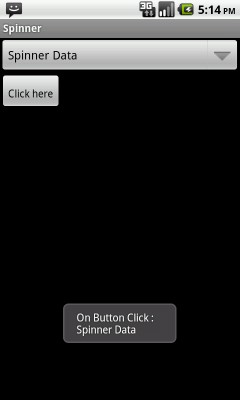
Creating listener for button to show selected spinner item.

    <?xml version="1.0" encoding="utf-8"?>
    <LinearLayout xmlns:android="http://schemas.android.com/apk/res/android"
        android:layout_width="fill_parent"
        android:layout_height="fill_parent"
        android:orientation="vertical" >

        <Spinner
            android:id="@+id/spinner1"
            android:layout_width="match_parent"
            android:layout_height="wrap_content"
            android:prompt="@string/spinner_prompt" />

        <Button
            android:id="@+id/btnSubmit"
            android:layout_width="wrap_content"
            android:layout_height="wrap_content"
            android:text="Click here"
            android:paddingTop="20px"
             />

    </LinearLayout>
Custom spinner item selection listener class implements OnItemSelectedListener ( Used in SpinnerExample.java ).
    import android.view.View;
    import android.widget.AdapterView;
    import android.widget.AdapterView.OnItemSelectedListener;
    import android.widget.Toast;

    public class CustomOnItemSelectedListener implements OnItemSelectedListener {

        public void onItemSelected(AdapterView<?> parent, View view, int pos,
                long id) {

            Toast.makeText(parent.getContext(),
                    "On Item Select : \n" + parent.getItemAtPosition(pos).toString(),
                    Toast.LENGTH_LONG).show();
        }

        @Override
        public void onNothingSelected(AdapterView<?> arg0) {
            // TODO Auto-generated method stub

        }

    }
import java.util.ArrayList;
import java.util.List;
import android.app.Activity;
import android.os.Bundle;
import android.view.View;
import android.view.View.OnClickListener;
import android.widget.ArrayAdapter;
import android.widget.Button;
import android.widget.Spinner;
import android.widget.Toast;

public class SpinnerExample extends Activity {

	private Spinner spinner1;
	private Button btnSubmit;

	@Override
	public void onCreate(Bundle savedInstanceState) {
		super.onCreate(savedInstanceState);
		setContentView(R.layout.main);

		spinner1 = (Spinner) findViewById(R.id.spinner1);
		List<String> list = new ArrayList<String>();
		list.add("Android");
		list.add("Java");
		list.add("Spinner Data");
		list.add("Spinner Adapter");
		list.add("Spinner Example");

		ArrayAdapter<String> dataAdapter = new ArrayAdapter<String>
                     (this, android.R.layout.simple_spinner_item,list);

		dataAdapter.setDropDownViewResource
                     (android.R.layout.simple_spinner_dropdown_item);

		spinner1.setAdapter(dataAdapter);

		// Spinner item selection Listener
		addListenerOnSpinnerItemSelection();

        // Button click Listener
		addListenerOnButton();


	}

	// Add spinner data

	public void addListenerOnSpinnerItemSelection(){

				spinner1.setOnItemSelectedListener(new CustomOnItemSelectedListener());
	}

	//get the selected dropdown list value

	public void addListenerOnButton() {

		spinner1 = (Spinner) findViewById(R.id.spinner1);

		btnSubmit = (Button) findViewById(R.id.btnSubmit);

		btnSubmit.setOnClickListener(new OnClickListener() {

			@Override
			public void onClick(View v) {

				Toast.makeText(SpinnerExample.this,
						"On Button Click : " +
						"\n" + String.valueOf(spinner1.getSelectedItem()) ,
						Toast.LENGTH_LONG).show();
			}

		});

	}

}
 Facebook Integration - Android Example Android SharedPreferences Basics Play Video File - Android Example Upload File To Server - Android Example Incomming SMS Broadcast Receiver - Android Example