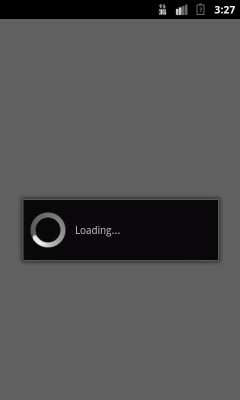
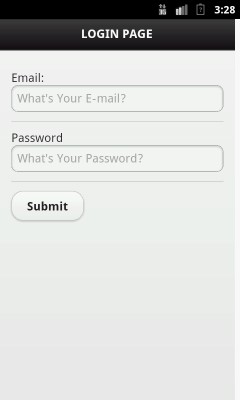
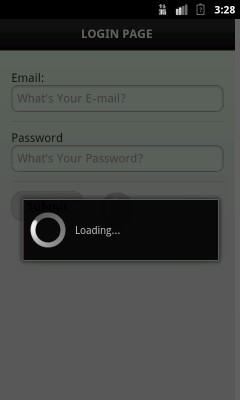
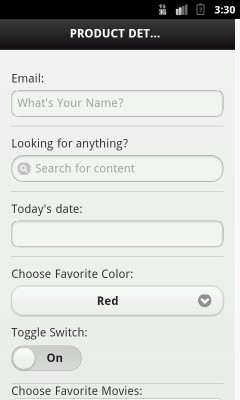
WebView is a View that displays web pages.If want to display html as the part of your UI then you can use WebView in your APP.
1. Opening url in webview.
2. Showing loader before page load.
3. Click opened url any link and again open page in webview.
package com.androidexample.webview;

import android.app.Activity;
import android.app.ProgressDialog;
import android.os.Bundle;
import android.webkit.WebView;
import android.webkit.WebViewClient;

public class ShowWebView extends Activity {

	//private Button button;
	private WebView webView;
	public void onCreate(Bundle savedInstanceState) {

		super.onCreate(savedInstanceState);
		setContentView(R.layout.show_web_view);

		//Get webview
		webView = (WebView) findViewById(R.id.webView1);

		startWebView("http://www.androidexample.com/media/webview/login.html");

	}

	private void startWebView(String url) {

		//Create new webview Client to show progress dialog
		//When opening a url or click on link

		webView.setWebViewClient(new WebViewClient() {
	        ProgressDialog progressDialog;

	        //If you will not use this method url links are opeen in new brower not in webview
	        public boolean shouldOverrideUrlLoading(WebView view, String url) {
	            view.loadUrl(url);
	            return true;
	        }

	        //Show loader on url load
	        public void onLoadResource (WebView view, String url) {
	            if (progressDialog == null) {
	                // in standard case YourActivity.this
	                progressDialog = new ProgressDialog(ShowWebView.this);
	                progressDialog.setMessage("Loading...");
	                progressDialog.show();
	            }
	        }
	        public void onPageFinished(WebView view, String url) {
	            try{
	            if (progressDialog.isShowing()) {
	                progressDialog.dismiss();
	                progressDialog = null;
	            }
	            }catch(Exception exception){
	                exception.printStackTrace();
	            }
	        }

	    });

	     // Javascript inabled on webview
	    webView.getSettings().setJavaScriptEnabled(true);

	    // Other webview options
	    /*
	    webView.getSettings().setLoadWithOverviewMode(true);
	    webView.getSettings().setUseWideViewPort(true);
	    webView.setScrollBarStyle(WebView.SCROLLBARS_OUTSIDE_OVERLAY);
	    webView.setScrollbarFadingEnabled(false);
	    webView.getSettings().setBuiltInZoomControls(true);
	    */

	    /*
	     String summary = "<html><body>You scored <b>192</b> points.</body></html>";
         webview.loadData(summary, "text/html", null);
	     */

	    //Load url in webview
	    webView.loadUrl(url);


	}

	// Open previous opened link from history on webview when back button pressed

	@Override
    // Detect when the back button is pressed
    public void onBackPressed() {
        if(webView.canGoBack()) {
            webView.goBack();
        } else {
            // Let the system handle the back button
            super.onBackPressed();
        }
    }

}
Define WebView in xml file.
<?xml version="1.0" encoding="utf-8"?>
<LinearLayout xmlns:android="http://schemas.android.com/apk/res/android"
    android:layout_width="fill_parent"
    android:layout_height="fill_parent"
    android:orientation="vertical" >

   <WebView
    android:id="@+id/webView1"
    android:layout_width="fill_parent"
    android:layout_height="fill_parent"
/>
</LinearLayout>
Use permission android.permission.INTERNET.
<?xml version="1.0" encoding="utf-8"?>
<manifest xmlns:android="http://schemas.android.com/apk/res/android"
    package="com.androidexample.webview"
    android:versionCode="1"
    android:versionName="1.0" >

    <uses-sdk
        android:minSdkVersion="10"
        android:targetSdkVersion="17" />

    <uses-permission android:name="android.permission.INTERNET" />

    <application
        android:icon="@drawable/ic_launcher"
        android:label="@string/app_name" >

        <activity
            android:label="@string/app_name"
            android:name=".ShowWebView"
            android:theme="@android:style/Theme.NoTitleBar">
            <intent-filter >
                <action android:name="android.intent.action.MAIN" />
                <category android:name="android.intent.category.LAUNCHER" />
            </intent-filter>
        </activity>
    </application>

</manifest>
 Facebook Integration - Android Example Android SharedPreferences Basics Play Video File - Android Example Upload File To Server - Android Example Incomming SMS Broadcast Receiver - Android Example