

Get Registered Email Accounts - Android Example
Create Notification Alert - Android Example
Skew Or Bind Image On SDCARD - Android Example
Swipe screen left right top bottom
Create Repeating Alarm Start After Each 2 Minutes
In this example creating a date picker to pick day month year of date.
Time Picker With AM_PM Values - Android Example
Time Picker Basics Part 1 - Android Example
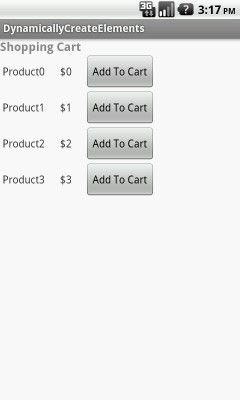
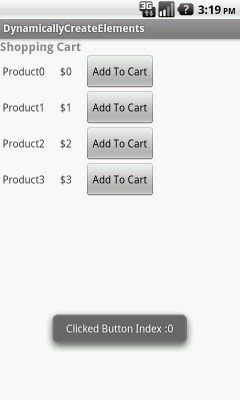
In this example creating some UI elements on screen on run time.
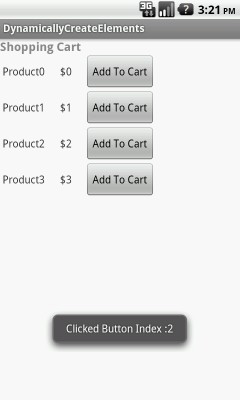
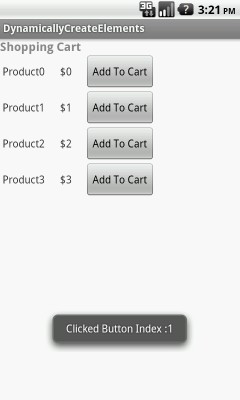
Creating textview , buttons dynamically and creating onclick listener for buttons. After click on button show index(id).
package com.androidexample.dynamicallycreateelements;

import android.os.Bundle;
import android.app.Activity;
import android.app.ActionBar.LayoutParams;
import android.util.Log;
import android.view.View;
import android.view.View.OnClickListener;
import android.widget.Button;
import android.widget.LinearLayout;
import android.widget.TextView;

public class MainActivity extends Activity {

	@Override
	protected void onCreate(Bundle savedInstanceState) {
		super.onCreate(savedInstanceState);
		setContentView(R.layout.dynamically_create_view_element);

		final LinearLayout lm = (LinearLayout) findViewById(R.id.linearMain);

		// create the layout params that will be used to define how your
	    // button will be displayed
		LinearLayout.LayoutParams params = new LinearLayout.LayoutParams(
	            LayoutParams.WRAP_CONTENT, LayoutParams.WRAP_CONTENT);

		//Create four
		for(int j=0;j<=4;j++)
		{
			// Create LinearLayout
			LinearLayout ll = new LinearLayout(this);
			ll.setOrientation(LinearLayout.HORIZONTAL);

			// Create TextView
			TextView product = new TextView(this);
			product.setText(" Product"+j+"    ");
			ll.addView(product);

			// Create TextView
			TextView price = new TextView(this);
			price.setText("  $"+j+"     ");
			ll.addView(price);

			// Create Button
			final Button btn = new Button(this);
			    // Give button an ID
				btn.setId(j+1);
				btn.setText("Add To Cart");
				// set the layoutParams on the button
				btn.setLayoutParams(params);

			    final int index = j;
			    // Set click listener for button
			    btn.setOnClickListener(new OnClickListener() {
			        public void onClick(View v) {

			            Log.i("TAG", "index :" + index);

                        Toast.makeText(getApplicationContext(),
			            		"Clicked Button Index :" + index,
		            			Toast.LENGTH_LONG).show();

			        }
			    });

			   //Add button to LinearLayout
			    ll.addView(btn);
			   //Add button to LinearLayout defined in XML
			    lm.addView(ll);
	    }
	}
}
 Facebook Integration - Android Example Android SharedPreferences Basics Play Video File - Android Example Upload File To Server - Android Example Incomming SMS Broadcast Receiver - Android Example