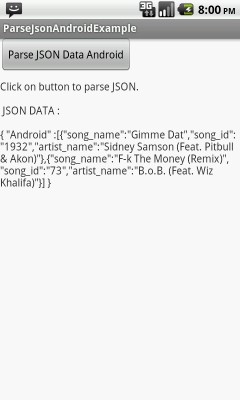
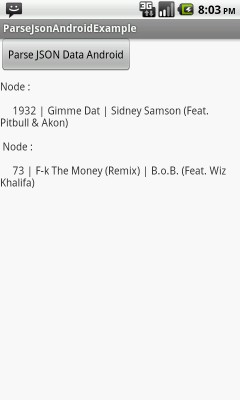
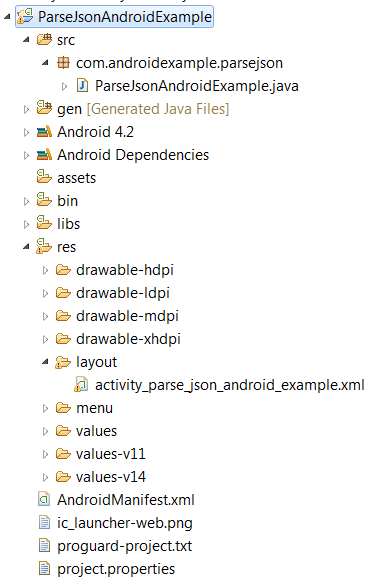
In this example we will learn how to parse JSON in android.
For better understanding taking a simple and static JSON to parse.
        {
           "Android" :
                    [
                       {
                          "song_name":"Gimme Dat",
                          "song_id":"1932",
                          "artist_name":"Sidney Samson (Feat. Pitbull & Akon)"
                       },
                       {
                          "song_name":"F-k The Money (Remix)",
                          "song_id":"73",
                          "artist_name":"B.o.B. (Feat. Wiz Khalifa)"
                       }
                     ]
        }
public class ParseJsonAndroidExample extends Activity {

    @Override
    protected void onCreate(Bundle savedInstanceState) {

        super.onCreate(savedInstanceState);
        setContentView(R.layout.activity_parse_json_android_example);

        final TextView output = (TextView) findViewById(R.id.output);
        final Button bparsejson      = (Button) findViewById(R.id.bparsejson);

        /************  Static JSON data ***********/
        final String strJson = "{ "Android" :[{"song_name":"Gimme Dat",
                                  "song_id":"1932",
                                  "artist_name":"Sidney Samson (Feat. Pitbull & Akon)"
                                },
                                { "song_name":"F-k The Money (Remix)",
                                   "song_id":"73",
                                   "artist_name":"B.o.B. (Feat. Wiz Khalifa)"}] }";

        String dataToBeParsed = "Click on button to parse JSON.\n\n JSON DATA : \n\n"+strJson;
        output.setText(dataToBeParsed);

        /******** Listener for button click ********/
        bparsejson.setOnClickListener(new OnClickListener() {
            public void onClick(View v) {

               String OutputData = "";
               JSONObject jsonResponse;

               try {

                    /****** Creates a new JSONObject with name/value mappings from the JSON string. ********/
                    jsonResponse = new JSONObject(strJson);

                    /***** Returns the value mapped by name if it exists and is a JSONArray. ***/
                    /*******  Returns null otherwise.  *******/
                    JSONArray jsonMainNode = jsonResponse.optJSONArray("Android");

                    /*********** Process each JSON Node ************/

                    int lengthJsonArr = jsonMainNode.length();

                    for(int i=0; i < lengthJsonArr; i++)
                    {
                        /****** Get Object for each JSON node.***********/
                        JSONObject jsonChildNode = jsonMainNode.getJSONObject(i);

                        /******* Fetch node values **********/
                        int song_id        = Integer.parseInt(jsonChildNode.optString("song_id").toString());
                        String song_name   = jsonChildNode.optString("song_name").toString();
                        String artist_name = jsonChildNode.optString("artist_name").toString();


                        OutputData += "Node : \n\n     "+ song_id +" | "
                                                        + song_name +" | "
                                                        + artist_name +" \n\n ";
                        //Log.i("JSON parse", song_name);
                   }

                    /************ Show Output on screen/activity **********/

                    output.setText( OutputData );

                } catch (JSONException e) {

                    e.printStackTrace();
                }

            }
        });
    }
}
         <LinearLayout xmlns:android="http://schemas.android.com/apk/res/android"
                    xmlns:tools="http://schemas.android.com/tools"
                    android:layout_width="match_parent"
                    android:layout_height="match_parent"
                    android:orientation="vertical"
                    tools:context=".ParseXmlAndroidExample" >

                    <Button
                         android:id="@+id/bparsejson"
                         android:text="Parse JSON Data Android"
                         android:layout_width="wrap_content"
                         android:layout_height="wrap_content">
                    </Button>

                    <TextView
                        android:id="@+id/output"
                        android:paddingTop="10px"
                        android:layout_width="fill_parent"
                        android:layout_height="fill_parent"
                        android:layout_centerHorizontal="true"
                        android:layout_centerVertical="true"
                        android:text="" />

         </LinearLayout>
 Facebook Integration - Android Example Android SharedPreferences Basics Play Video File - Android Example Upload File To Server - Android Example Incomming SMS Broadcast Receiver - Android Example