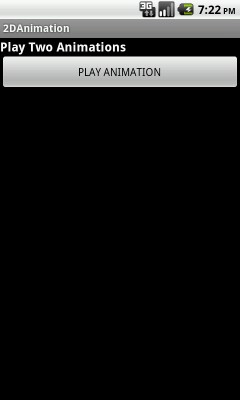
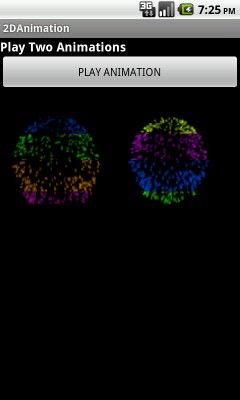
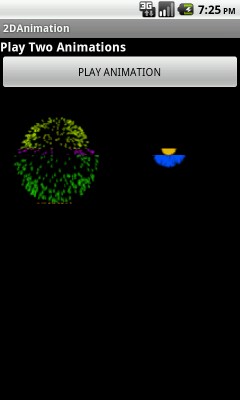
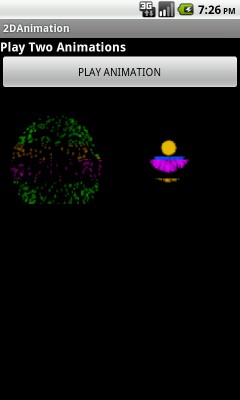
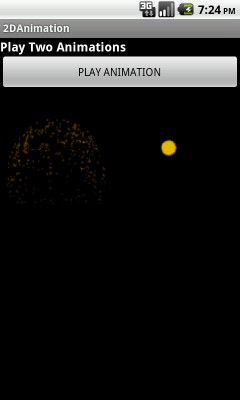
In this example showing frame by frame animation (2D Animation).
Draw 18 images after some time frame by frame .

- Call animation class and call loadAnimation method to initialize animation images.
- Call playAnimation method to play images frame by frame.
import com.androidexample.animation.R;
import android.os.Bundle;
import android.app.Activity;
import android.view.View;
import android.view.View.OnClickListener;
import android.widget.Button;

public class AnimationMain extends Activity {


	AnimationView anim_view;
	AnimationView anim_view1;

    /** Called when the activity is first created. */
    @Override
    public void onCreate(Bundle savedInstanceState)
    {
        super.onCreate(savedInstanceState);
        setContentView(R.layout.animatewin);

        // Get AnimationView reference see animation_main.xml
        anim_view = (AnimationView) this.findViewById(R.id.anim_view);
        anim_view.loadAnimation("spark", 18,0,0);

        // Get AnimationView reference see animation_main.xml
        anim_view1 = (AnimationView) this.findViewById(R.id.anim_view1);

        // You can call this method inside thread
        anim_view1.loadAnimation("spark", 18,0,0);

        Button play_button = (Button) this.findViewById(R.id.play_button);


        play_button.setOnClickListener(new OnClickListener() {
			public void onClick(View v) {

				//Play Both Animation
				anim_view.playAnimation();
		        anim_view1.playAnimation();

			}
		});

    }

    @Override
    protected void onDestroy() {

        super.onDestroy();

        // After activity close animation will close
        anim_view=null;
        anim_view1=null;

    }

}
<?xml version="1.0" encoding="utf-8"?>
<LinearLayout xmlns:android="http://schemas.android.com/apk/res/android"
     android:layout_width="fill_parent"
     android:layout_height="fill_parent"
     android:orientation="vertical"
     android:background="#000000"
    >


    <TextView
         android:textColor="#ffffff"
	     android:textSize="25px"
	     android:layout_width="fill_parent"
         android:layout_height="wrap_content"
		 android:text="Play Two Animations"
		 android:textStyle="bold"
		 android:layout_gravity="center_vertical|center_horizontal"
		/>

    <Button
        android:id="@+id/play_button"
        android:layout_width="fill_parent"
        android:layout_height="wrap_content"
        android:text="PLAY ANIMATION" />

   <LinearLayout
     android:layout_width="fill_parent"
    android:layout_height="150dip"
    >

	    <com.androidexample.animation.AnimationView
	        android:id="@+id/anim_view"
	        android:layout_width="150dip"
	        android:layout_height="150dip"  />

	    <com.androidexample.animation.AnimationView
	        android:id="@+id/anim_view1"
	        android:layout_width="150dip"
	        android:layout_height="150dip" />

   </LinearLayout>


</LinearLayout>
- It is the main animation class.
- Create AnimationView class object to animate image.
- Call postInvalidate() method to call onDraw() method.
import java.util.ArrayList;
import android.content.Context;
import android.graphics.Bitmap;
import android.graphics.Canvas;
import android.graphics.drawable.BitmapDrawable;
import android.util.AttributeSet;
import android.util.Log;
import android.widget.ImageView;


public class AnimationView extends ImageView
{
	private static final String TAG = "AnimationView";
	private Context mContext = null;

	private static final int DELAY = 100; //delay between frames in milliseconds
	private  int drawX = 0;
	private  int drawY = 0;

	private boolean mIsPlaying = false;
	private boolean mStartPlaying = false;

	private ArrayList<Bitmap> mBitmapList = new ArrayList<Bitmap>();

	private int play_frame = 0;
    private long last_tick = 0;

    public AnimationView(Context context, AttributeSet attrs)
    {
    	super(context, attrs);
    	mContext = context;
    }

    @Override
    protected void onDraw(Canvas c)
    {
    	/******* onDraw method called first time and when postInvalidate() called *****/

    	//Log.d(TAG, "onDraw called");
        if (mStartPlaying)
        {
            Log.d(TAG, "starting animation...");
            play_frame = 0;
            mStartPlaying = false;
            mIsPlaying = true;

            // Again call onDraw method
            postInvalidate();
        }
        else if (mIsPlaying)
        {

            if (play_frame >= mBitmapList.size())
            {
                //mIsPlaying = false;
                play_frame=0;

                // Again call onDraw method
                postInvalidate();
            }
            else
            {
                long time = (System.currentTimeMillis() - last_tick);

                int draw_x = drawX;
                int draw_y = drawY;
                if (time >= DELAY) //the delay time has passed. set next frame
                {
                    last_tick = System.currentTimeMillis();
                    c.drawBitmap(mBitmapList.get(play_frame), draw_x, draw_y, null);
                    play_frame++;

                    // Again call onDraw method
                    postInvalidate();
                }
                else //still within delay.  redraw current frame
                {
                    c.drawBitmap(mBitmapList.get(play_frame), draw_x, draw_y, null);

                    // Again call onDraw method
                    postInvalidate();
                }
            }
        }
    }

    /*ideally this should be in a background thread*/
    public void loadAnimation(String prefix, int nframes,int drawx,int drawy)
    {
    	drawX = drawx;
    	drawY = drawy;
    	mBitmapList.clear();

        for (int x = 0; x < nframes; x++)
        {
        	String name = prefix + "" + x;  // prefix = "spark" see loadAnimation call

        	//Log.d(TAG, "loading animation frame: " + name);

        	// Set Bitmap image
        	int res_id = mContext.getResources().getIdentifier(name, "drawable", mContext.getPackageName());
        	BitmapDrawable d = (BitmapDrawable) mContext.getResources().getDrawable(res_id);
        	mBitmapList.add(d.getBitmap());
        }
    }

    public void playAnimation()
    {
    	mStartPlaying = true;

    	// Again call onDraw method
    	postInvalidate();
    }
}
<?xml version="1.0" encoding="utf-8"?>
<manifest xmlns:android="http://schemas.android.com/apk/res/android"
    package="com.androidexample.animation"
    android:versionCode="1"
    android:versionName="1.0" >

    <uses-sdk
        android:minSdkVersion="8"
        android:targetSdkVersion="8" />

    <application
        android:allowBackup="true"
        android:icon="@drawable/ic_launcher"
        android:label="@string/app_name"
        android:theme="@style/AppTheme" >
        <activity
            android:name="com.androidexample.animation.AnimationMain"
            android:label="@string/app_name" >
            <intent-filter>
                <action android:name="android.intent.action.MAIN" />

                <category android:name="android.intent.category.LAUNCHER" />
            </intent-filter>
        </activity>
    </application>

</manifest>
 Facebook Integration - Android Example Android SharedPreferences Basics Play Video File - Android Example Upload File To Server - Android Example Incomming SMS Broadcast Receiver - Android Example