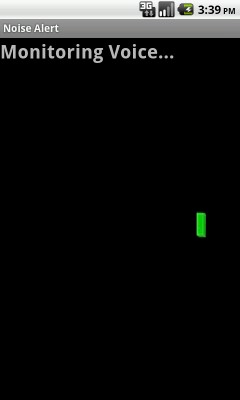
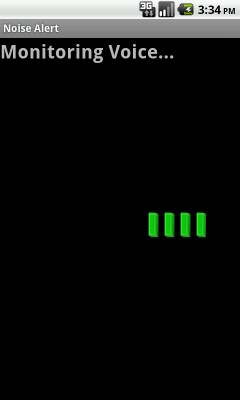
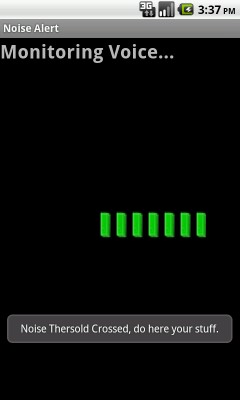
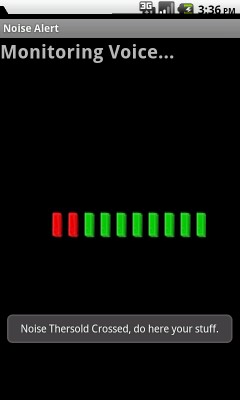
In this example broadcasting screen wake / sleep event with a service.
In this example detecting noice and setting a noise thersold , when this noise/sound frequency cross thersold ,example will show an alert.

Define SoundLevelView reference to show sound meter in view.
<?xml version="1.0" encoding="utf-8"?>
<LinearLayout xmlns:android="http://schemas.android.com/apk/res/android"
        android:layout_width="fill_parent"
        android:layout_height="fill_parent"
        android:orientation="vertical"
>
        <TextView
        android:id="@+id/status"
                android:layout_width="wrap_content"
                android:layout_height="wrap_content"
        android:layout_centerInParent="true"
        android:textSize="25sp"
        android:textStyle="bold"
        android:text="@string/stopped"
    />
        <RelativeLayout
        android:layout_width="fill_parent"
        android:layout_height="fill_parent"
    >
        <LinearLayout
                android:orientation="vertical"
                android:layout_width="wrap_content"
                android:layout_height="wrap_content"
                android:layout_centerInParent="true"
        >

                        <com.androidexample.noisealert.SoundLevelView
                        android:id="@+id/volume"
                        android:layout_width="230sp"
                        android:layout_height="60sp"

                />
        </LinearLayout>
        </RelativeLayout>
</LinearLayout>
import android.app.Activity;
import android.content.Context;
import android.os.Bundle;
import android.os.Handler;
import android.os.PowerManager;
import android.util.Log;
import android.widget.TextView;
import android.widget.Toast;

public class NoiseAlert extends Activity  {
        /* constants */
        private static final int POLL_INTERVAL = 300;

        /** running state **/
        private boolean mRunning = false;

        /** config state **/
        private int mThreshold;

        private PowerManager.WakeLock mWakeLock;

        private Handler mHandler = new Handler();

        /* References to view elements */
        private TextView mStatusView;
        private SoundLevelView mDisplay;

        /* data source */
        private SoundMeter mSensor;


     /****************** Define runnable thread again and again detect noise *********/

        private Runnable mSleepTask = new Runnable() {
                public void run() {
                	//Log.i("Noise", "runnable mSleepTask");

                	start();
                }
        };

        // Create runnable thread to Monitor Voice
        private Runnable mPollTask = new Runnable() {
                public void run() {

                        double amp = mSensor.getAmplitude();
                        //Log.i("Noise", "runnable mPollTask");
                        updateDisplay("Monitoring Voice...", amp);

                        if ((amp > mThreshold)) {
                              callForHelp();
                              //Log.i("Noise", "==== onCreate ===");

                        }

                        // Runnable(mPollTask) will again execute after POLL_INTERVAL
                        mHandler.postDelayed(mPollTask, POLL_INTERVAL);

                }
        };

         /*********************************************************/

        /** Called when the activity is first created. */
        @Override
        public void onCreate(Bundle savedInstanceState) {
                super.onCreate(savedInstanceState);

                // Defined SoundLevelView in main.xml file
                setContentView(R.layout.main);
                mStatusView = (TextView) findViewById(R.id.status);

                // Used to record voice
                mSensor = new SoundMeter();
                mDisplay = (SoundLevelView) findViewById(R.id.volume);

                PowerManager pm = (PowerManager) getSystemService(Context.POWER_SERVICE);
                mWakeLock = pm.newWakeLock(PowerManager.SCREEN_DIM_WAKE_LOCK, "NoiseAlert");
        }


        @Override
        public void onResume() {
                super.onResume();
                //Log.i("Noise", "==== onResume ===");

                initializeApplicationConstants();
                mDisplay.setLevel(0, mThreshold);

                if (!mRunning) {
                    mRunning = true;
                    start();
                }
        }

        @Override
        public void onStop() {
                super.onStop();
               // Log.i("Noise", "==== onStop ===");

                //Stop noise monitoring
                stop();

        }

        private void start() {
        	    //Log.i("Noise", "==== start ===");

                mSensor.start();
                if (!mWakeLock.isHeld()) {
                        mWakeLock.acquire();
                }

                //Noise monitoring start
                // Runnable(mPollTask) will execute after POLL_INTERVAL
                mHandler.postDelayed(mPollTask, POLL_INTERVAL);
        }

        private void stop() {
        	Log.i("Noise", "==== Stop Noise Monitoring===");
                if (mWakeLock.isHeld()) {
                        mWakeLock.release();
                }
                mHandler.removeCallbacks(mSleepTask);
                mHandler.removeCallbacks(mPollTask);
                mSensor.stop();
                mDisplay.setLevel(0,0);
                updateDisplay("stopped...", 0.0);
                mRunning = false;

        }


        private void initializeApplicationConstants() {
                // Set Noise Threshold
        	    mThreshold = 8;

        }

        private void updateDisplay(String status, double signalEMA) {
                mStatusView.setText(status);
                //
                mDisplay.setLevel((int)signalEMA, mThreshold);
        }


        private void callForHelp() {

              //stop();

        	 // Show alert when noise thersold crossed
        	  Toast.makeText(getApplicationContext(), "Noise Thersold Crossed, do here your stuff.",
        			  Toast.LENGTH_LONG).show();
        }

};
SoundLevelView class is used to draw a sound meter on view ( Called in main.xml file ).
import android.content.Context;
import android.graphics.Canvas;
import android.graphics.Color;
import android.graphics.Paint;
import android.graphics.drawable.Drawable;
import android.util.AttributeSet;
import android.view.View;

class SoundLevelView extends View {
        private Drawable mGreen;
        private Drawable mRed;
        private Paint mBackgroundPaint;

        private int mHeight;
        private int mWidth;

        private int mThreshold = 0;
        private int mVol = 0;


        public SoundLevelView(Context context, AttributeSet attrs) {
               super(context, attrs);

                mGreen 	= context.getResources().getDrawable(
                          R.drawable.greenbar);
                mRed 	= context.getResources().getDrawable(
                          R.drawable.redbar);

                mWidth  = mGreen.getIntrinsicWidth();
                setMinimumWidth(mWidth*10);

                mHeight = mGreen.getIntrinsicHeight();
                setMinimumHeight(mHeight);

                //Used to paint canvas background color
                mBackgroundPaint = new Paint();
                mBackgroundPaint.setColor(Color.BLACK);

        }

        public void setLevel(int volume, int threshold) {
                if (volume == mVol && threshold == mThreshold) return;
                mVol = volume;
                mThreshold = threshold;

                // invalidate Call onDraw method and draw voice points
                invalidate();
        }

        @Override
        public void onDraw(Canvas canvas) {

                canvas.drawPaint(mBackgroundPaint);

                for (int i=0; i<= mVol; i++) {
                        Drawable bar;
                        if (i< mThreshold)
                        	bar = mGreen;
                        else
                        	bar = mRed;

                        bar.setBounds((10-i)*mWidth, 0, (10-i+1)*mWidth, mHeight);
                        bar.draw(canvas);
                }
        }
}
Create SoundMeter class to record noise/sound.
import java.io.IOException;
import android.media.MediaRecorder;

public class SoundMeter {
	    // This file is used to record voice
        static final private double EMA_FILTER = 0.6;

        private MediaRecorder mRecorder = null;
        private double mEMA = 0.0;

        public void start() {

        	if (mRecorder == null) {

                        mRecorder = new MediaRecorder();
                        mRecorder.setAudioSource(MediaRecorder.AudioSource.MIC);
                        mRecorder.setOutputFormat(MediaRecorder.OutputFormat.THREE_GPP);
                        mRecorder.setAudioEncoder(MediaRecorder.AudioEncoder.AMR_NB);
                        mRecorder.setOutputFile("/dev/null");

	                    try {
							mRecorder.prepare();
						} catch (IllegalStateException e) {
							// TODO Auto-generated catch block
							e.printStackTrace();
						} catch (IOException e) {
							// TODO Auto-generated catch block
							e.printStackTrace();
						}

                       mRecorder.start();
                       mEMA = 0.0;
                }
        }

        public void stop() {
                if (mRecorder != null) {
                        mRecorder.stop();
                        mRecorder.release();
                        mRecorder = null;
                }
        }

        public double getAmplitude() {
                if (mRecorder != null)
                        return  (mRecorder.getMaxAmplitude()/2700.0);
                else
                        return 0;

        }

        public double getAmplitudeEMA() {
                double amp = getAmplitude();
                mEMA = EMA_FILTER * amp + (1.0 - EMA_FILTER) * mEMA;
                return mEMA;
        }
}
Define RECORD_AUDIO and WAKE_LOCK permission.
<?xml version="1.0" encoding="utf-8"?>
<manifest xmlns:android="http://schemas.android.com/apk/res/android"
      package="com.androidexample.noisealert"
      android:versionCode="1"
      android:versionName="1.0.0">

    <uses-permission android:name="android.permission.RECORD_AUDIO" />
    <uses-permission android:name="android.permission.WAKE_LOCK" />

    <application android:icon="@drawable/icon" android:label="@string/app_name">
        <activity android:name="com.androidexample.noisealert.NoiseAlert"
                  android:label="@string/app_name">
            <intent-filter>
                <action android:name="android.intent.action.MAIN" />
                <category android:name="android.intent.category.LAUNCHER" />
            </intent-filter>
        </activity>

    </application>

    <uses-sdk
        android:minSdkVersion="8"
        android:targetSdkVersion="8" />

</manifest>
 Facebook Integration - Android Example Android SharedPreferences Basics Play Video File - Android Example Upload File To Server - Android Example Incomming SMS Broadcast Receiver - Android Example