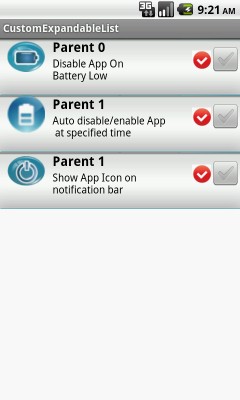
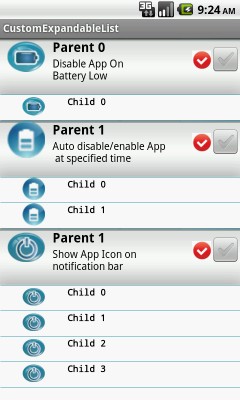
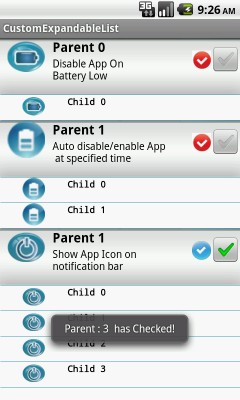
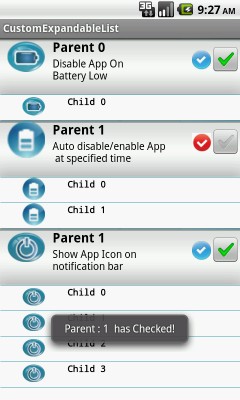
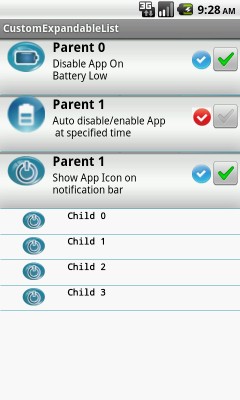
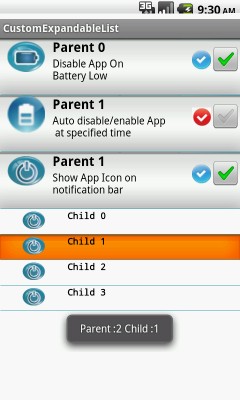


In this example creating a custom Expandable ListView with parent and child rows. parent rows contains texts,images and a checkbox. child rows contains texts,images. Creating custom adapter to create Expandable ListView rows .
1. Create Model classes for parent rows(Parent.java) and for child rows(Child.java). These classes will use to store parent rows and child rows data.
2. Create xml files for parent rows(grouprow.xml) and for child rows(childrow.xml). These classes will use to create GUI for parent rows and child rows.
3. Create dummy data in parent and child model objects and Store objects in an ArrayList.
4. Create custom Adapter MyExpandableListAdapter class and inflate grouprow.xml file for parent rows() and childrow.xml for child rows. Use Models Parent.java and Child.java to create data for rows.

- It will store data for parent rows.
import java.util.ArrayList;

public class Parent
{
	private String name;
	private String text1;
	private String text2;
	private String checkedtype;
	private boolean checked;

    // ArrayList to store child objects
	private ArrayList children;

	public String getName()
	{
		return name;
	}

	public void setName(String name)
	{
		this.name = name;
	}
	public String getText1()
	{
		return text1;
	}

	public void setText1(String text1)
	{
		this.text1 = text1;
	}

	public String getText2()
	{
		return text2;
	}

	public void setText2(String text2)
	{
		this.text2 = text2;
	}
	public String getCheckedType()
	{
		return checkedtype;
	}

	public void setCheckedType(String checkedtype)
	{
		this.checkedtype = checkedtype;
	}


	public boolean isChecked()
	{
		return checked;
	}
	public void setChecked(boolean checked)
	{
		this.checked = checked;
	}

    // ArrayList to store child objects
	public ArrayList getChildren()
	{
		return children;
	}

	public void setChildren(ArrayList children)
	{
		this.children = children;
	}
}
- It will store data for child rows.
public class Child
{
	private String name;
	private String text1;
	private String text2;

	public String getName()
	{
		return name;
	}

	public void setName(String name)
	{
		this.name = name;
	}

	public String getText1()
	{
		return text1;
	}

	public void setText1(String text1)
	{
		this.text1 = text1;
	}

	public String getText2()
	{
		return text2;
	}

	public void setText2(String text2)
	{
		this.text2 = text2;
	}
}
- It will inflate in adapter to create parent rows gui.
<?xml version="1.0" encoding="utf-8"?>
<!-- PARENT -->

<TableLayout xmlns:android="http://schemas.android.com/apk/res/android"
	android:layout_width="fill_parent"
	android:layout_height="wrap_content"
	android:background="@drawable/bar_bg"
	android:stretchColumns="1" android:paddingTop="0dip" android:layout_gravity="top"
   >
  <TableRow>
        <ImageView
				   android:id="@+id/image"
	               android:layout_width="50dip"
	               android:layout_height="50dip"
	               android:layout_marginLeft="10dip"/>
  <TableLayout
	android:layout_width="wrap_content"
	android:layout_height="wrap_content"
	android:stretchColumns="1" android:paddingTop="0dip" android:layout_gravity="top"
   >
      <TableRow>
		    <TextView
		  	  android:id="@+id/text1"
		  	  android:textColor="#000000"
		  	  android:layout_height="wrap_content"
			  android:layout_width="wrap_content"
			  android:layout_weight="1" android:layout_gravity="left|center_vertical"
			  android:textSize="17dip" android:layout_marginLeft="10dip"
			  android:textStyle="bold"/>
		</TableRow>
         <TableRow >
		  <TextView
		  	  android:id="@+id/text"
		  	  android:layout_height="wrap_content"
			  android:layout_width="wrap_content"
			  android:textColor="#000000"
			  android:layout_weight="1" android:layout_gravity="left|center_vertical"
			  android:textSize="14dip" android:layout_marginLeft="10dip"/>
	   </TableRow>
  	 </TableLayout>
   <ImageView
	        android:layout_width="25dip"
	        android:id="@+id/rightcheck"
	        android:layout_height="25dip"
	        android:layout_gravity="left|center_vertical"
	        android:scaleType="centerCrop"
	        android:background="@drawable/rightcheck"
	        />
	 <CheckBox android:id="@+id/checkbox" android:focusable="false"
		android:layout_alignParentRight="true" android:freezesText="false"
		android:layout_width="wrap_content" android:layout_height="wrap_content"
		android:layout_marginTop="5px" />

  </TableRow>
</TableLayout>
- It will inflate in adapter to create child rows gui.
<?xml version="1.0" encoding="utf-8"?>
<!-- CHILD -->
<TableLayout xmlns:android="http://schemas.android.com/apk/res/android"
	android:layout_width="fill_parent"
	android:layout_height="wrap_content"
    android:stretchColumns="1" android:paddingTop="0dip" android:layout_gravity="top"

   > <!--   android:background="@drawable/bar_bg" -->

  <TableRow>
        <ImageView
				   android:id="@+id/image"
	               android:layout_width="30dip"
	               android:layout_height="30dip"
	               android:layout_marginLeft="30dip"/>
  <TableLayout
	android:layout_width="wrap_content"
	android:layout_height="wrap_content"
	android:stretchColumns="1" android:paddingTop="0dip" android:layout_gravity="top"
   >
      <TableRow>
		    <TextView
		  	  android:id="@+id/text1"
		  	  style="@style/SettingCodeFontBold"
		  	  android:layout_height="wrap_content"
			  android:layout_width="wrap_content"
			  android:layout_weight="1" android:layout_gravity="left|center_vertical"
			  android:textSize="12dip" android:layout_marginLeft="30dip"


			  />
		</TableRow>
         <TableRow >
		  <TextView
		  	  android:id="@+id/text"
		  	  style="@style/SettingCodeFont"
		  	  android:layout_height="wrap_content"
			  android:layout_width="wrap_content"
			  android:layout_weight="1" android:layout_gravity="left|center_vertical"
			  android:textSize="12dip" android:layout_marginLeft="30dip"/>
	   </TableRow>
  	 </TableLayout>

  </TableRow>
</TableLayout>
- Please see comments i have put comments for each lines code.
import com.androidexample.customexpandablelist.R;
import java.util.ArrayList;
import android.os.Bundle;
import android.app.ExpandableListActivity;
import android.content.res.Resources;
import android.graphics.drawable.Drawable;
import android.util.Log;
import android.view.LayoutInflater;
import android.view.View;
import android.view.ViewGroup;
import android.widget.BaseExpandableListAdapter;
import android.widget.CheckBox;
import android.widget.CompoundButton;
import android.widget.ImageView;
import android.widget.TextView;
import android.widget.Toast;
import android.widget.CompoundButton.OnCheckedChangeListener;

public class ExpandableListMain extends  ExpandableListActivity
{
	//Initialize variables
	private static final String STR_CHECKED = " has Checked!";
	private static final String STR_UNCHECKED = " has unChecked!";
	private int ParentClickStatus=-1;
	private int ChildClickStatus=-1;
	private ArrayList<Parent> parents;

	@Override
	protected void onCreate(Bundle savedInstanceState)
	{
		super.onCreate(savedInstanceState);

		Resources res = this.getResources();
	    Drawable devider = res.getDrawable(R.drawable.line);

	    // Set ExpandableListView values

	    getExpandableListView().setGroupIndicator(null);
		getExpandableListView().setDivider(devider);
		getExpandableListView().setChildDivider(devider);
		getExpandableListView().setDividerHeight(1);
		registerForContextMenu(getExpandableListView());

		//Creating static data in arraylist
		final ArrayList<Parent> dummyList = buildDummyData();

		// Adding ArrayList data to ExpandableListView values
		loadHosts(dummyList);
	}

	/**
	 * here should come your data service implementation
	 * @return
	 */
	private ArrayList<Parent> buildDummyData()
	{
		// Creating ArrayList of type parent class to store parent class objects
		final ArrayList<Parent> list = new ArrayList<Parent>();
		for (int i = 1; i < 4; i++)
		{
			//Create parent class object
			final Parent parent = new Parent();

			  // Set values in parent class object
			      if(i==1){
			    	  parent.setName("" + i);
			    	  parent.setText1("Parent 0");
			    	  parent.setText2("Disable App On \nBattery Low");
			    	  parent.setChildren(new ArrayList<Child>());

			    	  // Create Child class object
			    	  final Child child = new Child();
						child.setName("" + i);
						child.setText1("Child 0");

						//Add Child class object to parent class object
						parent.getChildren().add(child);
			        }
		    	   else if(i==2){
		    		   parent.setName("" + i);
				       parent.setText1("Parent 1");
				       parent.setText2("Auto disable/enable App \n at specified time");
				       parent.setChildren(new ArrayList<Child>());

				       final Child child = new Child();
						child.setName("" + i);
						child.setText1("Child 0");
						parent.getChildren().add(child);
					   final Child child1 = new Child();
						child1.setName("" + i);
						child1.setText1("Child 1");
						parent.getChildren().add(child1);
		        	 }
		    	   else if(i==3){
		    		   parent.setName("" + i);
				       parent.setText1("Parent 1");
				       parent.setText2("Show App Icon on \nnotification bar");
				       parent.setChildren(new ArrayList<Child>());

				       final Child child = new Child();
						child.setName("" + i);
						child.setText1("Child 0");
						parent.getChildren().add(child);
					   final Child child1 = new Child();
						child1.setName("" + i);
						child1.setText1("Child 1");
						parent.getChildren().add(child1);
					  final Child child2 = new Child();
						child2.setName("" + i);
						child2.setText1("Child 2");
						parent.getChildren().add(child2);
					   final Child child3 = new Child();
						child3.setName("" + i);
						child3.setText1("Child 3");
						parent.getChildren().add(child3);
		        	  }

		    //Adding Parent class object to ArrayList
			list.add(parent);
		}
		return list;
	}


	private void loadHosts(final ArrayList<Parent> newParents)
	{
		if (newParents == null)
			return;

		parents = newParents;

		// Check for ExpandableListAdapter object
		if (this.getExpandableListAdapter() == null)
		{
			 //Create ExpandableListAdapter Object
			final MyExpandableListAdapter mAdapter = new MyExpandableListAdapter();

			// Set Adapter to ExpandableList Adapter
			this.setListAdapter(mAdapter);
		}
		else
		{
			 // Refresh ExpandableListView data
			((MyExpandableListAdapter)getExpandableListAdapter()).notifyDataSetChanged();
		}
	}

	/**
	 * A Custom adapter to create Parent view (Used grouprow.xml) and Child View((Used childrow.xml).
	 */
	private class MyExpandableListAdapter extends BaseExpandableListAdapter
	{


		private LayoutInflater inflater;

		public MyExpandableListAdapter()
		{
			// Create Layout Inflator
			inflater = LayoutInflater.from(ExpandableListMain.this);
		}


		// This Function used to inflate parent rows view

		@Override
		public View getGroupView(int groupPosition, boolean isExpanded,
				View convertView, ViewGroup parentView)
		{
			final Parent parent = parents.get(groupPosition);

			// Inflate grouprow.xml file for parent rows
			convertView = inflater.inflate(R.layout.grouprow, parentView, false);

			// Get grouprow.xml file elements and set values
			((TextView) convertView.findViewById(R.id.text1)).setText(parent.getText1());
			((TextView) convertView.findViewById(R.id.text)).setText(parent.getText2());
			ImageView image=(ImageView)convertView.findViewById(R.id.image);

			image.setImageResource(
                getResources().getIdentifier(
                   "com.androidexample.customexpandablelist:drawable/setting"+parent.getName(),null,null));

			ImageView rightcheck=(ImageView)convertView.findViewById(R.id.rightcheck);

			//Log.i("onCheckedChanged", "isChecked: "+parent.isChecked());

			// Change right check image on parent at runtime
			if(parent.isChecked()==true){
				rightcheck.setImageResource(
                     getResources().getIdentifier(
                          "com.androidexample.customexpandablelist:drawable/rightcheck",null,null));
			}
			else{
				rightcheck.setImageResource(
                     getResources().getIdentifier(
                          "com.androidexample.customexpandablelist:drawable/button_check",null,null));
			}

			// Get grouprow.xml file checkbox elements
			CheckBox checkbox = (CheckBox) convertView.findViewById(R.id.checkbox);
			checkbox.setChecked(parent.isChecked());

			// Set CheckUpdateListener for CheckBox (see below CheckUpdateListener class)
			checkbox.setOnCheckedChangeListener(new CheckUpdateListener(parent));

			return convertView;
		}


		// This Function used to inflate child rows view
		@Override
		public View getChildView(int groupPosition, int childPosition, boolean isLastChild,
				View convertView, ViewGroup parentView)
		{
			final Parent parent = parents.get(groupPosition);
			final Child child = parent.getChildren().get(childPosition);

			// Inflate childrow.xml file for child rows
			convertView = inflater.inflate(R.layout.childrow, parentView, false);

			// Get childrow.xml file elements and set values
			((TextView) convertView.findViewById(R.id.text1)).setText(child.getText1());
			ImageView image=(ImageView)convertView.findViewById(R.id.image);
			image.setImageResource(
               getResources().getIdentifier(
                  "com.androidexample.customexpandablelist:drawable/setting"+parent.getName(),null,null));

			return convertView;
		}


		@Override
		public Object getChild(int groupPosition, int childPosition)
		{
			//Log.i("Childs", groupPosition+"=  getChild =="+childPosition);
			return parents.get(groupPosition).getChildren().get(childPosition);
		}

		//Call when child row clicked
		@Override
		public long getChildId(int groupPosition, int childPosition)
		{
			/****** When Child row clicked then this function call *******/

			//Log.i("Noise", "parent == "+groupPosition+"=  child : =="+childPosition);
			if( ChildClickStatus!=childPosition)
			{
			   ChildClickStatus = childPosition;

			   Toast.makeText(getApplicationContext(), "Parent :"+groupPosition + " Child :"+childPosition ,
						Toast.LENGTH_LONG).show();
			}

			return childPosition;
		}

		@Override
		public int getChildrenCount(int groupPosition)
		{
			int size=0;
			if(parents.get(groupPosition).getChildren()!=null)
				size = parents.get(groupPosition).getChildren().size();
			return size;
		}


		@Override
		public Object getGroup(int groupPosition)
		{
			Log.i("Parent", groupPosition+"=  getGroup ");

			return parents.get(groupPosition);
		}

		@Override
		public int getGroupCount()
		{
			return parents.size();
		}

		//Call when parent row clicked
		@Override
		public long getGroupId(int groupPosition)
		{
			Log.i("Parent", groupPosition+"=  getGroupId "+ParentClickStatus);

			if(groupPosition==2 && ParentClickStatus!=groupPosition){

				//Alert to user
				Toast.makeText(getApplicationContext(), "Parent :"+groupPosition ,
						Toast.LENGTH_LONG).show();
			}

			ParentClickStatus=groupPosition;
			if(ParentClickStatus==0)
				ParentClickStatus=-1;

			return groupPosition;
		}

		@Override
		public void notifyDataSetChanged()
		{
			// Refresh List rows
			super.notifyDataSetChanged();
		}

		@Override
		public boolean isEmpty()
		{
			return ((parents == null) || parents.isEmpty());
		}

		@Override
		public boolean isChildSelectable(int groupPosition, int childPosition)
		{
			return true;
		}

		@Override
		public boolean hasStableIds()
		{
			return true;
		}

		@Override
		public boolean areAllItemsEnabled()
		{
			return true;
		}


		/******************* Checkbox Checked Change Listener ********************/

		private final class CheckUpdateListener implements OnCheckedChangeListener
		{
			private final Parent parent;

			private CheckUpdateListener(Parent parent)
			{
				this.parent = parent;
			}
			public void onCheckedChanged(CompoundButton buttonView, boolean isChecked)
			{
				Log.i("onCheckedChanged", "isChecked: "+isChecked);
				parent.setChecked(isChecked);

				((MyExpandableListAdapter)getExpandableListAdapter()).notifyDataSetChanged();

				final Boolean checked = parent.isChecked();
				Toast.makeText(getApplicationContext(),
                      "Parent : "+parent.getName() + " " + (checked ? STR_CHECKED : STR_UNCHECKED),
						   Toast.LENGTH_LONG).show();
			}
		}
		/***********************************************************************/

	}
}
<?xml version="1.0" encoding="utf-8"?>
<manifest xmlns:android="http://schemas.android.com/apk/res/android"
    package="com.androidexample.customexpandablelist"
    android:versionCode="1"
    android:versionName="1.0" >

    <uses-sdk
        android:minSdkVersion="8"
        android:targetSdkVersion="8" />

    <application
        android:allowBackup="true"
        android:icon="@drawable/ic_launcher"
        android:label="@string/app_name"
        android:theme="@style/AppTheme" >
        <activity
            android:name="com.androidexample.customexpandablelist.ExpandableListMain"
            android:label="@string/app_name" >
            <intent-filter>
                <action android:name="android.intent.action.MAIN" />

                <category android:name="android.intent.category.LAUNCHER" />
            </intent-filter>
        </activity>
    </application>

</manifest>
 Facebook Integration - Android Example Android SharedPreferences Basics Play Video File - Android Example Upload File To Server - Android Example Incomming SMS Broadcast Receiver - Android Example